
Unlimited Data.
Infinite Possibilities.
Looking for B2B data? Download Unlimited data using our Chrome extension at just $79/month.

Hunter.io API: Email Finding and Verification Explained

How to Evaluate B2B Data Vendors for Accuracy and Compliance

Finding someone’s professional email address used to mean guessing formats, bouncing messages, and wasting hours on manual research. The Hunter.io API changed that equation by letting you programmatically access email finding and verification at scale.

This guide walks through how the API works, what each endpoint does, pricing and limits, and how Hunter stacks up against alternatives for your prospecting workflow.

What is the Hunter.io API?

The Hunter.io API is a RESTful interface that lets you programmatically access Hunter’s email finding, verification, and enrichment data. Rather than manually searching for contacts on the Hunter.io website, you can automate the entire process and pull verified email addresses directly into your CRM, sales tools, or custom applications.

What does “RESTful” actually mean? It’s a standard web architecture that uses familiar HTTP methods (GET, POST, etc.) to send requests and receive responses. This makes the API predictable and compatible with virtually any programming language.

A few key characteristics define how the Hunter.io API works:

  • JSON responses: All data comes back in JSON format, a lightweight text structure that’s easy for both humans to read and machines to parse.
  • Credit-based consumption: Each API call uses credits from your account, and different endpoints consume different amounts.
  • Authentication via API key: You pass a unique key with every request to identify your account and track usage.
Hunter.io Email Finder API

The Email Finder is the core functionality most teams reach for first. Given a person’s name and their company domain, it returns the most likely email address for that individual.

How Email Finder works

You provide three inputs: first name, last name, and domain (like acme.com). Hunter then searches its database and applies pattern recognition to generate or locate the matching email address.

Each result includes a confidence score from 0 to 100. A score of 90+ suggests high reliability, while anything below 50 warrants additional verification before you hit send.

Email Finder API request and response

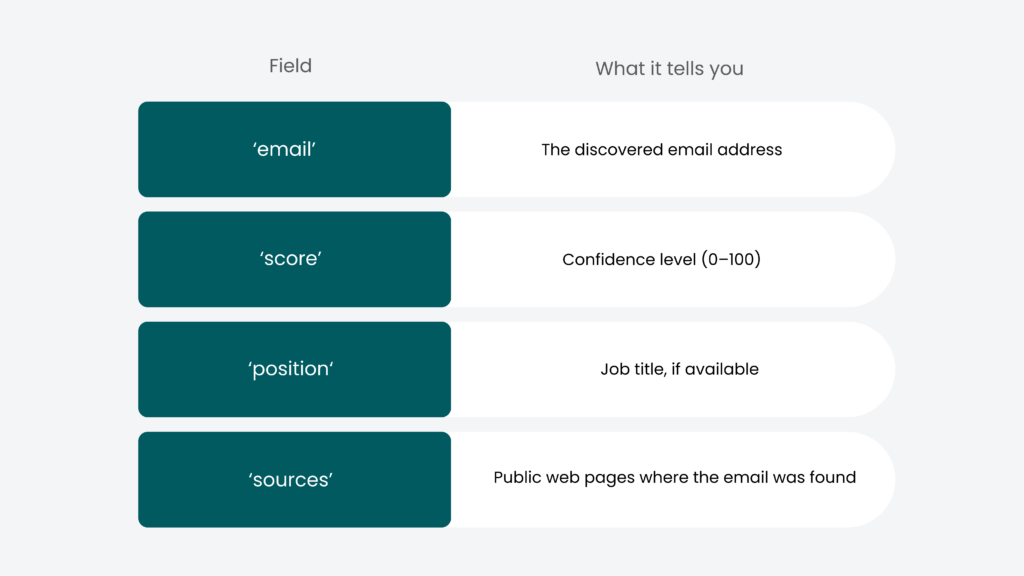
The endpoint is straightforward. You make a GET request with your parameters, and the response includes several useful fields:

Hunter.io Email Finder API

Email Finder use cases

Where does the Email Finder fit into your workflow? Sales teams use it to build prospect lists without manual research. Marketing teams populate campaign databases. Recruiters find candidate contact information after identifying profiles on LinkedIn.

The real value shows up at scale—when you’re processing hundreds or thousands of contacts and can’t afford to look each one up individually.

Hunter.io Domain Search API

While the Email Finder targets specific individuals, Domain Search takes a broader approach. You provide a company domain, and it returns all publicly associated email addresses for that organization.

How Domain Search works

Enter a domain like company.com, and the API returns every email address Hunter has indexed for that domain. More importantly, it identifies the email pattern used at that company—whether it’s firstname.lastname@, first.last@, or another format.

Pattern detection is genuinely useful here. Even if Hunter doesn’t have a specific person in its database, you can predict their email address with reasonable accuracy once you know the company’s format.

Domain Search API request and response

You can filter results by department (marketing, sales, engineering) to narrow your focus. The response includes:

  • A list of found email addresses with associated names and titles
  • The detected email pattern for the domain
  • Source URLs where each email was discovered
  • Confidence scores for each contact

Hunter.io Email Verifier API

Finding an email is only half the battle. Sending to invalid addresses damages your sender reputation and wastes campaign resources. The Email Verifier API checks whether an address is actually deliverable before you send.

How Email Verifier works

Verification happens in multiple stages. First, the API runs a syntax check to confirm the email is formatted correctly. Then it validates the domain to ensure it exists and has valid mail exchange (MX) records. Finally, it pings the mail server to confirm the specific mailbox exists—without actually sending an email.

Verification statuses and accuracy

The API returns one of four statuses:

  • Valid: Safe to send with very low bounce probability.
  • Invalid: The mailbox doesn’t exist, and sending will result in a hard bounce.
  • Accept-all: The domain accepts any email address, making verification impossible. Proceed with caution.
  • Unknown: The server didn’t respond, so the status couldn’t be determined.

Accept-all domains remain a blind spot across the industry—not just for Hunter. When you encounter one, you’re essentially rolling the dice on deliverability.

Email Verifier use cases

Pre-campaign list cleaning is the obvious application. Run your entire list through verification before launching an email sequence, and you’ll protect your deliverability metrics. Real-time verification on web forms is another common pattern—when someone enters their email on your site, you can validate it instantly and prompt for correction if it’s invalid.

Hunter.io API pricing and credits

How much does all of this cost? Hunter operates on a credit-based model where different actions consume different amounts from your monthly allowance.

Free tier credits and limits

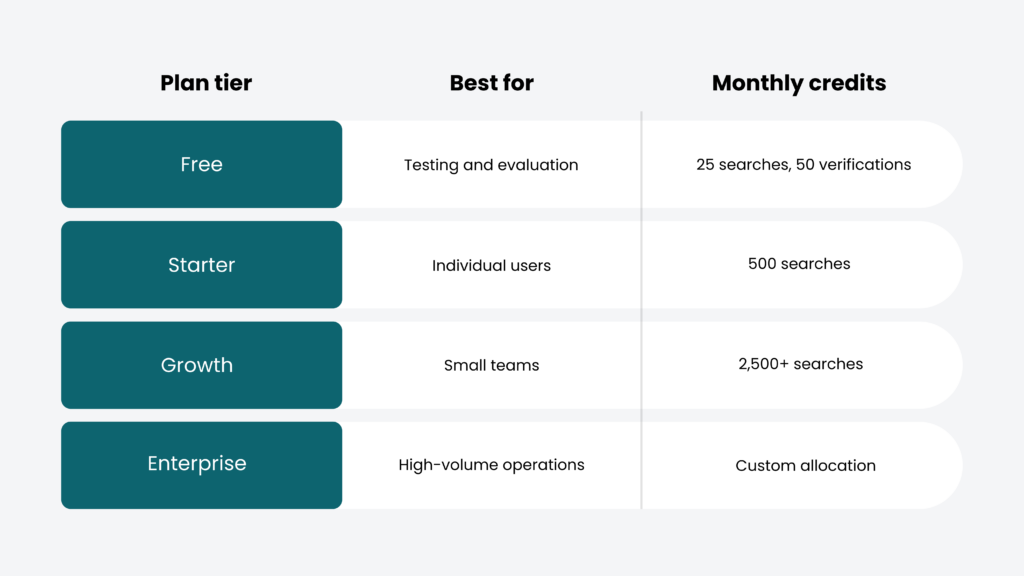
Hunter offers a free plan with 25 monthly searches and 50 verifications. That’s enough to test the API and build a proof of concept, but not enough for production use.

Starter and Growth plans

Paid plans start around $49/month and scale based on credit volume. Starter and Growth tiers suit individual contributors and small teams running regular prospecting campaigns.

Scale and Enterprise plans

High-volume users can access custom credit allocations, dedicated support, and enterprise features. Pricing varies based on usage requirements.

Hunter.io free plan limits for API access

The free tier is genuinely useful for testing, but you’ll hit its boundaries quickly in any real workflow. Credits reset monthly on your signup anniversary date, and unused credits don’t roll over.

Rate limits also apply. Free accounts face stricter throttling than paid plans, which matters if you’re building automated workflows that make rapid sequential requests. Some advanced data points and endpoints may be restricted on free accounts as well.

How to get started with Hunter.io API

Ready to make your first call? Here’s the path from signup to working integration.

1. Create your Hunter.io account

Head to hunter.io and sign up. The process takes about two minutes, and you’ll land on a free plan automatically.

2. Generate your API key

Navigate to the API section in your dashboard. Your unique API key appears there—copy it and store it securely. Treat this key like a password, and never expose it in client-side code or public repositories.

3. Make your first API call

Construct a simple GET request to test your setup. For example:

https://api.hunter.io/v2/email-finder?

domain=example.com&first_name=John&last_name=Doe&api_key=YOUR_KEY

4. Handle errors and rate limits

Familiarize yourself with common HTTP status codes. A 401 means your API key is invalid. A 429 means you’ve hit rate limits—implement retry logic with exponential backoff to handle this gracefully.

Hunter.io extension and browser add-ons

Not everyone wants to write code. Hunter’s browser extensions bring API functionality to a point-and-click interface.

Chrome extension features

The Chrome extension lets you find email addresses for any website you’re viewing. Visit a company’s site, click the extension, and see associated contacts instantly. It’s the same data as the API, just wrapped in a visual interface.

Firefox and Edge add-ons

Hunter maintains official add-ons for Firefox and Edge with equivalent functionality. Cross-browser support means your team isn’t locked into a single browser choice.

Hunter.io API integrations and wrappers

How do you connect Hunter to your existing stack? Several options exist depending on your technical comfort level.

CRM integrations

Native integrations with Salesforce, HubSpot, and Pipedrive let you enrich contacts and verify emails without leaving your CRM. Setup typically requires just authentication and sync configuration.

API wrappers and SDKs

Official and community-maintained libraries exist for Python, Ruby, PHP, Node.js, and other languages. Wrappers handle authentication, error handling, and response parsing so you can focus on your application logic.

Zapier and workflow automation

For no-code automation, Hunter connects to Zapier. You can build workflows like “when a new row appears in Google Sheets, verify the email and update the status column”—all without writing a single line of code.

Is Hunter.io legal and GDPR compliant

A reasonable question: where does this data come from, and is it legal to use?

Hunter sources its data from publicly available information on the web. When you look up an email, the response includes the public sources where that address was found—giving you transparency into the data’s origin. Hunter is GDPR compliant and provides mechanisms for individuals to request data deletion.

Alternatives to Hunter.io API

Hunter isn’t your only option. Depending on your priorities—price, data volume, enrichment depth—other platforms might fit better.

Apollo.io API

Apollo.io positions itself as an all-in-one sales platform with a larger contact database. The pricing model is more complex, but you get additional features like sequencing and engagement tracking.

ZoomInfo API

ZoomInfo targets enterprise buyers with comprehensive company intelligence. Data quality is excellent, but pricing reflects that—expect significantly higher costs than Hunter.

Clearbit API

Clearbit excels at real-time enrichment, particularly for website personalization and lead scoring. It’s popular among product-led growth teams.

ReachStream API

ReachStream offers a cost-effective alternative with a pay-only-for-verified-emails model. The Reach API provides access to 150M+ contacts with flexible credit-based pricing and native CRM integrations—worth evaluating if deliverability and workflow fit are priorities.

How to choose the right email finding API for your workflow?

With multiple options available, how do you decide? Consider data accuracy requirements, volume expectations, integration compatibility, and budget constraints. Calculate cost per verified contact across different providers to find the best fit.

Reach more with ReachStream!

Frequently asked questions

1. Is Hunter.io API free to use?

Hunter offers a free tier with limited monthly credits—enough for testing but not for production workflows. Paid plans unlock higher volumes and additional features.

Rate limits vary by plan. Free accounts face stricter throttling than paid tiers. Check your dashboard for your specific limits.

Primary use cases include email finding, verification, and lead enrichment. Teams integrate it into prospecting workflows, CRM enrichment, and campaign list building.

Hunter’s verifier checks syntax, domain validity, and mailbox existence. Accuracy is high for most domains, though accept-all servers remain difficult to verify across any platform.

Yes. Hunter offers native integrations with major CRMs including Salesforce, HubSpot, and Pipedrive, plus Zapier connectivity for custom workflows.

API calls return an error when credits are exhausted. Credits reset at your next billing cycle, or you can upgrade your plan for immediate access.

Manohar Devdiga

Marketing professional with a Master’s degree in Marketing, specializing in SEO, content strategy, social media, performance marketing, prospecting, and demand generation.

Share
Table of Contents

Access 200M+ verified business emails and grow your sales pipeline effortlessly.

Power Your Sales with Targeted Data

Don't forget to share this post!

Check out our other blogs!